msw-cli & Agent Skills: Let AI Agents Drive Your MSW Mocks
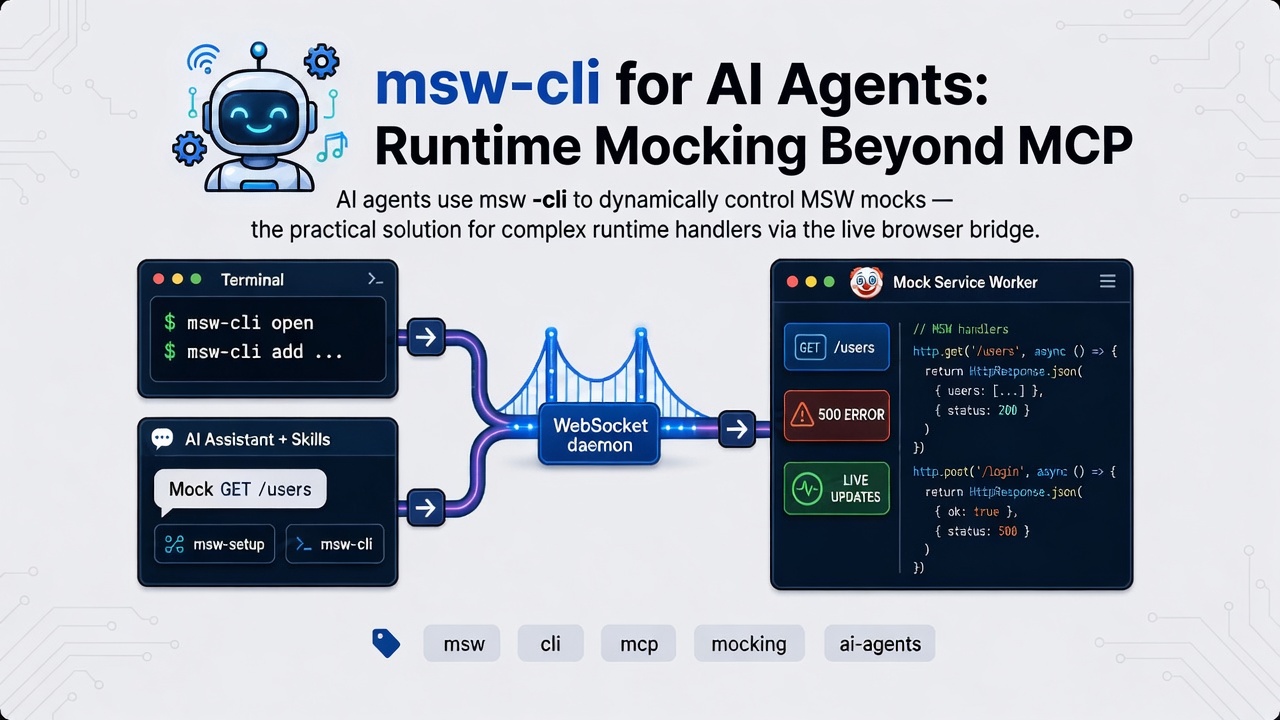
In an earlier post, I introduced msw-mcp: an MCP server that lets an AI agent change Mock Service Worker handlers in the browser in real time.
That path still works. What is new is a second, agent-friendly path into the same system: msw-cli, plus agent skills that teach AI agents how to use it.
Chinese version: 简体中文
Why a CLI — if it is for AI agents?
msw-cli looks like a normal developer CLI. In practice, it is mainly for AI agents.
Writing MSW handler code by hand in a shell is painful: long JS strings, quoting, escaping, and encoding issues. A human can run simple commands like open or status, but day-to-day mock changes are almost always done by an AI agent that generates the handler and runs msw-cli add / update / remove for you.
So the real loop is:
- You describe the API behavior in natural language.
- The AI agent writes the handler and calls
msw-cli. - The browser MSW worker updates live — no restart, no editing mock files for every tweak.
Think of it like playwright-cli: the shell interface is the contract AI agents can call reliably. Skills teach them the contract.
What is new?
Three updates matter for agent-driven workflows:
msw-cli— the same add / update / remove / reset / status flow as MCP tools, but over a shell session. Useful when the AI agent has a terminal (Cursor Agent, Claude Code, scripts) and you do not want to depend on MCP alone.- Sessions —
open→ work →close, similar toplaywright-cli. AI agents can list and reuse sessions across projects instead of starting duplicate daemons. - Agent skills —
msw-setupandmsw-cliskills so AI agents follow the right workflow (setup first, then runtime commands; do not edit on-disk handlers for temporary mocks).
MCP tools and the CLI talk to the same daemon and the same browser bridge. Both are control surfaces for AI agents — you pick the one that fits how your AI agent runs.
How the architecture looks now
At a high level:
  You (natural language)
       |
       v
  AI agent
       |
       +-- MCP tools (msw-mcp) ----+
       |                           |
       +-- Shell (msw-cli) --------+
                                   v
                         MSW daemon (WebSocket)
                                   |
                                   v
                    Browser (@msw-mcp/client + MSW)
In short:
- You ask the AI agent for a mock change.
- The AI agent either calls an MCP tool or runs an
msw-clicommand. - The daemon sends the change over WebSocket.
@msw-mcp/clientin the browser applies it to the live MSW worker.- The next matching request uses the new mock.
The CLI session loop the AI agent follows:
open → add / update / remove / reset → status → closeQuick start
Install the CLI once (global or via npx):
npm install -g msw-cli1. Set up the project (once)
msw-cli setup
# optional: msw-cli setup --framework vite
Or let the AI agent follow the msw-setup skill / /msw-setup prompt. The guide installs msw and @msw-mcp/client, inits the service worker, creates mocks/, and sets the WebSocket URL env var (VITE_MSW_WS_URL, NEXT_PUBLIC_MSW_WS_URL, or MSW_WS_URL).
If you already set up via /msw-setup from the first post, you can skip this.
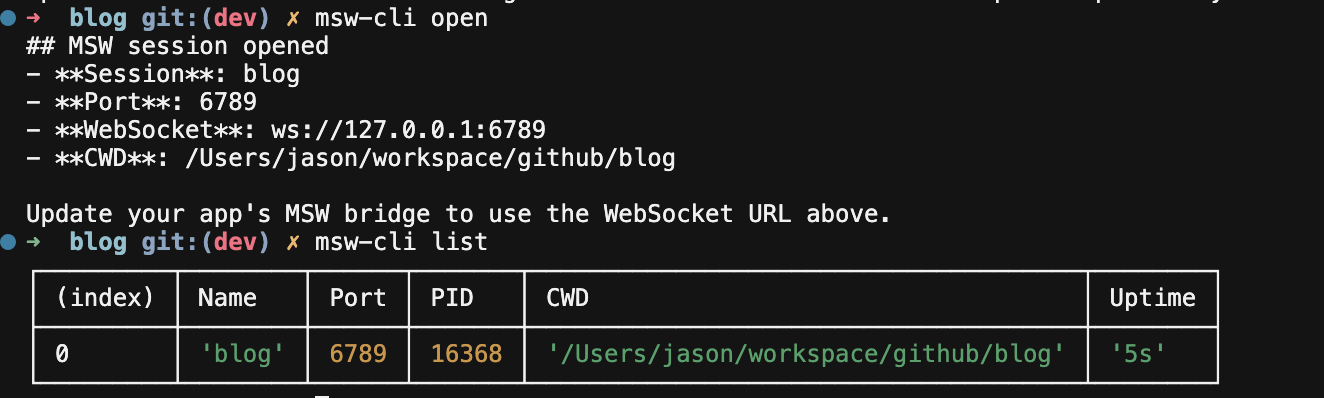
2. Open a session
You or the AI agent:
msw-cli list          # reuse an existing session if one is open
msw-cli open          # or: msw-cli open --port 6789
open prints the Port and WebSocket URL. If the port is not the one your app uses, update the env var and reload the page.
3. Let the AI agent change mocks at runtime
You say something like: “Mock GET /api/users to return a list with one user.”
The AI agent runs commands like:
msw-cli status        # connected must be true
msw-cli add "http.get('/api/users', () => HttpResponse.json([{ id: 1 }]))"
msw-cli update "/api/users" -h "http.get('/api/users', () => HttpResponse.json([{ id: 1, name: 'Ada' }]))"
msw-cli remove "*/api/users"
msw-cli reset
msw-cli close
Handler strings are plain JS. http, graphql, HttpResponse, bypass, passthrough, and delay are already in scope — no imports needed. That is easy for an AI agent to generate; awkward to type by hand in a shell.
Agent skills
Install the skills:
npx skills add JasonBoy/msw-mcp --skill msw-cli
npx skills add JasonBoy/msw-mcp --skill msw-setup
Follow the prompts for install scope (project vs global). After that, Cursor (and other supported AI agents) can discover them.
What they cover:
msw-cli— runtime mock changes via the CLImsw-setup— scaffold MSW + the client bridge
These skills steer the AI agent toward good habits:
- Prefer
msw-cli add/update/removeover editing on-diskhandlers.tsfor temporary runtime mocks - Run
list/statusbeforeopen, so it does not start a duplicate daemon - Match
remove/updatepatterns to the URL (not theMETHOD URLline fromstatus), or use-m GET
You stay in natural language. The skill helps the AI agent pick the right commands and avoid common mistakes.
Practical tips
- Persistence is on by default when you
open. Handlers can survive a page refresh. Use--no-persist-handlersto turn that off, or--persist-handlers 10to keep only the last N. statusshowsMETHOD URL, butremove/updatepatterns match the URL. Preferremove "*/api/users"orremove "*/api/users" -m GET.- If
updatematches 0 handlers, the new handler is still added (likeadd). The AI agent should fix the pattern instead of updating again, or you may get duplicates. --single-clientsends commands only to the most recently connected tab.
For MCP config, /msw-setup details, and handler-order tips, see the intro post.
Why this over other mocking tools?
Many teams mock APIs with proxy tools (Charles, Proxyman), API client mock servers (Postman, Apifox), or quick JSON file servers. Those are fine for many jobs. msw-cli and msw-mcp stand out when you want:
- Real URL paths — the app keeps calling
/api/users; MSW intercepts in the browser. No need to pointAPI_URLat a separate mock server. - JavaScript handlers — full
Request/Responselogic in the same language as your app, not a tool-specific template DSL. - Live updates without reload — change a mock from the CLI or MCP while the page stays open (form half-filled, modal open). Stock MSW in dev often means edit
handlers.tsand reload. - Built for AI agents — natural language → handler code → next fetch. No proxy GUI or exporting API collections.
- One mock layer for dev and tests — the same MSW handlers can power Vitest, Jest, and Playwright, not a second mock definition in another tool.
Proxy tools are still a better fit for native mobile apps with zero code changes, or when you only need a PM-owned mock server during API design.
Final thoughts
msw-mcp and msw-cli are two AI agent control surfaces over the same live MSW bridge. MCP fits AI agents that speak MCP. The CLI fits AI agents that run shell commands — and skills make that path reliable.
You describe the mock. The AI agent applies it. The browser updates.
Repo: github.com/JasonBoy/msw-mcp
Docs: msw-mcp-docs.vercel.app
Happy Mocking! 🤡